







Your apartment goes quiet. The refrigerator stops humming, your laptop switches to its own battery, and the Wi-Fi disappears just as you reach for your phone.
You want a backup plan. But you don't have a garage, a place to store fuel, or permission to start changing the building's wiring. You might not even have a balcony.
That's a perfectly reasonable place to start. For many renters, apartment backup power means a portable battery power station for selected appliances, supported by simple things like a phone power bank and rechargeable lights. You can charge a suitable power station from a wall outlet before an outage. Solar panels are optional.
The part I'd help you work out first is what you need that battery to accomplish. Keeping your phone charged is one job. Keeping the refrigerator, internet equipment, and a few other essentials running until morning is a bigger one.
Let's walk through those decisions together, including the less glamorous questions: where the battery will sit, whether you can carry it upstairs, and what you'll do if the electricity is still off tomorrow.
Start with the apartment you actually live in
Before you shop, picture an outage beginning at eight tonight. What would you be trying to do over the next twelve hours?
Maybe you need to finish some work, keep a light on while the kids get ready for bed, charge two phones, and protect the groceries. Write those things down. They're the beginning of your power plan.
I would also ask your building manager three practical questions:
- Does any building backup power reach the outlets inside your apartment, or does it serve shared equipment and common areas?
- What is the outage plan for elevators, building entry, and water service?
- What rules apply to portable batteries, charging locations, and any outdoor solar panels you're considering?
Get answers for your building. An emergency light working in the stairwell doesn't tell you whether your refrigerator outlet has power. And being able to use a portable battery doesn't automatically give you permission to attach equipment to a balcony railing.
Also think about how you'll get help or leave if conditions become uncomfortable or unsafe. A battery can support your appliances; the building's elevator, plumbing, and shared systems are separate questions.
If someone relies on powered medical equipment, start with that device's manufacturer and their care team's backup guidance. Its requirements should shape the plan before you budget power for everyday conveniences.
Choose the kind of backup that solves your problem
Several products get described as “battery backup,” but they don't all do the same job. You may find that a small combination works better for you than one large purchase.
A power bank for your phone and small USB devices
If your main concern is staying reachable during a short outage, a charged power bank and a rechargeable light may cover the immediate need. Check the ports and charging output against your phone or laptop. A connector that fits doesn't automatically provide the power a laptop expects.
I like keeping a separate phone battery even when there's a larger power station in the plan. It gives you something easy to take with you if you leave the apartment, without disconnecting everything else.
A UPS for equipment that shouldn't suddenly lose power
A UPS, short for uninterruptible power supply, can help bridge a power interruption for compatible electronics. Some are intended mainly to give you time to save your work and shut down. Others can support modest networking loads for longer.
Look at the manufacturer's runtime information for your actual load, the output rating, and the switching behavior. The large VA number on a UPS listing is a power rating, not a promise of hours of battery life.
A desktop computer that needs a controlled shutdown presents a different problem from a laptop with its own healthy battery. Buy for the problem you have.
A portable power station for longer use and selected appliances
A power station combines a rechargeable battery with outlets and other outputs. Depending on the model and your appliances, it can support internet equipment, lights, laptops, fans, or a refrigerator.
If you've been searching for a “solar generator for an apartment,” this is the battery part of that setup. Our explanation of how a solar generator works covers the terminology. You don't have to buy panels to use a power station that supports wall charging.
A power station may also advertise a UPS feature, but check its manual. Switching speed, supported equipment, and limits while connected to wall power vary. Treat “UPS” as a feature to investigate, rather than a guarantee that every connected device will stay on without interruption.
the battery to do?
A fuel generator isn't an indoor apartment option
A gasoline or propane generator produces carbon monoxide. Never operate one inside an apartment, garage, hallway, or other enclosed or partly enclosed space. A balcony isn't a safe workaround: the EPA's generator-placement guidance specifically rules out balconies, decks, and porches.
Opening a window doesn't solve that exhaust problem. For the indoor plan we're building here, choose battery equipment intended for indoor use and follow its placement and ventilation instructions.
Decide what gets power before you decide how much to spend
Give each device a job and a time allowance. “Laptop for two hours” is much more useful than “office.” “One lamp until bedtime” is clearer than “lights.”
Keep the refrigerator as its own decision. It can make a substantial difference to your energy requirement, and you'll need to check whether the power station can start its compressor as well as keep it running.
For internet access, include all the equipment your connection needs. That may mean a combined gateway, or a separate modem and router. A fiber connection may also have a powered optical network terminal. Don't assume powering the Wi-Fi router alone completes the chain.
Your battery supplies electricity to your equipment; it cannot restore a failed provider network. Check your provider's outage information before spending hours of battery energy trying to revive a connection that is unavailable upstream. For example, Xfinity's connection troubleshooting guidance directs customers to check for service outages.
Have an alternative communication plan, such as a charged phone and an available cellular connection, while recognizing that cellular service can also be disrupted.
For cooking and comfort appliances, look at both power and duration. A hypothetical 1,200W appliance used for ten minutes consumes 200Wh at the appliance. That one short use would exceed the laptop, lighting, and phone-charging energy combined in the example below. A space heater running for hours is a much larger commitment.
You don't have to rule out every convenience. Just decide what you're willing to give up elsewhere to power it.
Let's size an overnight apartment backup together
Two numbers matter when you're choosing a power station:
- Watts (W): how much power your devices need at a particular moment. The station must handle the combined running load and any required startup surge.
- Watt-hours (Wh): how much energy is stored or used over time. This is the starting point for estimating how long the battery will last.
A high output rating doesn't give you a long runtime by itself. For the fuller explanation, our solar generator sizing guide walks through both checks.
Before relying on refrigerator backup, check the refrigerator's documentation and the station's continuous and surge limits. A basic energy meter may miss a brief startup peak. If the required startup power isn't clear, get the appliance model number and ask for help checking compatibility; don't turn an average-energy reading into a startup-power estimate.
First, give the night an energy budget
Here's an invented apartment scenario from 8 p.m. to 8 a.m. These are planning assumptions, not measurements of your appliances or a product test.
| What we're powering | Assumed use | Energy |
|---|---|---|
| Modem and router together | 18W for 12 hours | 216Wh |
| One LED lamp | 8W for 5 hours | 40Wh |
| Laptop through its AC charger | 45W average for 2 hours | 90Wh |
| Two phones through AC chargers | 40Wh combined for the night | 40Wh |
| Essentials subtotal | Without the refrigerator | 386Wh |
| Optional refrigerator | 50W average over 12 hours | 600Wh |
| Total with refrigerator | Same overnight period | 986Wh |
That refrigerator average deserves an explanation. Imagine a plug-in energy meter recorded 1.2kWh over a representative 24-hour day. That's 1,200Wh divided by 24 hours, or 50W on average. For this example, we're assuming the following twelve hours use half that daily energy.
The fridge doesn't necessarily draw 50W continuously. Its compressor cycles, and defrost or other functions can change consumption. A warmer apartment, warm food, and different door-opening habits can change the next night's total. Measure over a representative period rather than taking one instantaneous reading.
The laptop's charger label also isn't a measurement of continuous consumption. A charger capable of 65W won't necessarily draw 65W for every hour it's plugged in. In this example, 45W is an assumed average during the two-hour charging session.
Then allow for the power station itself
The nameplate battery capacity doesn't all arrive at your appliances. To make our assumptions visible, let's use:
- 90% conversion efficiency for the AC energy delivered to the devices.
- A separate, hypothetical 10W of power-station consumption while the AC output stays on for twelve hours: another 120Wh from the battery.
- A fully charged starting battery, with 10% of its nominal capacity kept as a chosen reserve.
These aren't specifications for either product discussed later. Actual efficiency and station consumption vary. If a manufacturer's runtime calculation already includes its own consumption, don't subtract the same loss twice.
Our essentials-only plan uses approximately 386Wh ÷ 0.90 + 120Wh = 549Wh from the battery.
Add the refrigerator, and the estimate becomes 986Wh ÷ 0.90 + 120Wh = 1,216Wh from the battery.
Keeping our chosen 10% reserve means the second plan needs at least about 1,216Wh ÷ 0.90 = 1,351Wh of nominal capacity under these assumptions. I would start comparing roughly 1,500–2,000Wh options for this particular example, then check appliance startup, actual losses, and a margin for a worse night.
For comparison, a hypothetical 1,000Wh battery has 900Wh available above that reserve. It covers the 549Wh essentials estimate, but it falls short of the 1,216Wh refrigerator-inclusive estimate.
the overnight budget.
Internet equipment, laptop, two phones, and lighting.
Same essentials, plus 600Wh for an assumed refrigerator load.
Make the example a little less comfortable
Suppose your refrigerator uses 1.8kWh per day instead of 1.2kWh. Using the same half-day assumption, its overnight share rises to 900Wh. The total battery demand becomes about 1,549Wh, and the minimum nominal capacity with our reserve rises to about 1,721Wh.
A hypothetical 2,000Wh battery would have only about 251Wh left above the reserve after that night. That helps you see why an “overnight” claim needs an appliance list and assumptions behind it.
The station's own consumption matters, too. If it used 20W instead of our assumed 10W over twelve hours, you would need another 120Wh from the battery. Small loads don't make those background costs disappear.
USB charging or separately powered lights may change the calculation, but you'd need to account for their own losses and capacities. You can organize your household's numbers in the Grid Getaway Power Planner. Our refrigerator runtime guide goes deeper on the fridge-specific checks.
Check the space and carrying weight before choosing a model
Now put the calculator down and get a tape measure. Where will the station sit while it's running? Can you reach the outlets and controls? Where do its vents need room?
A storage spot and an operating spot may be different. A unit that fits in a cupboard with the door closed doesn't necessarily belong there while charging or supplying power. Follow the model's clearance and ventilation instructions.
Think through the route from the delivery entrance to that spot. Include stairs, narrow turns, and whether you would need help lifting it. Wheels help on suitable level surfaces; they don't remove the weight on a staircase.
Two real Jackery models illustrate the trade-off. These are manufacturer specifications for the U.S. models, not measured performance results:
| Details | Explorer 1000 v2 | Home |
|---|---|---|
| Nominal capacity | 1,070Wh | 3,072Wh |
| Total AC output on battery | 1,500W rated | 3,600W maximum |
| Approximate weight | 23.8lb | 59.5lb |
| Size L × W × H |
12.87 × 8.82 × 9.72in | 16.4 × 12.8 × 12in |
Specifications come from the Explorer 1000 v2 manual and HomePower 3000 manual. Total output ratings don't override individual socket limits, operating-mode limits, or appliance startup requirements.
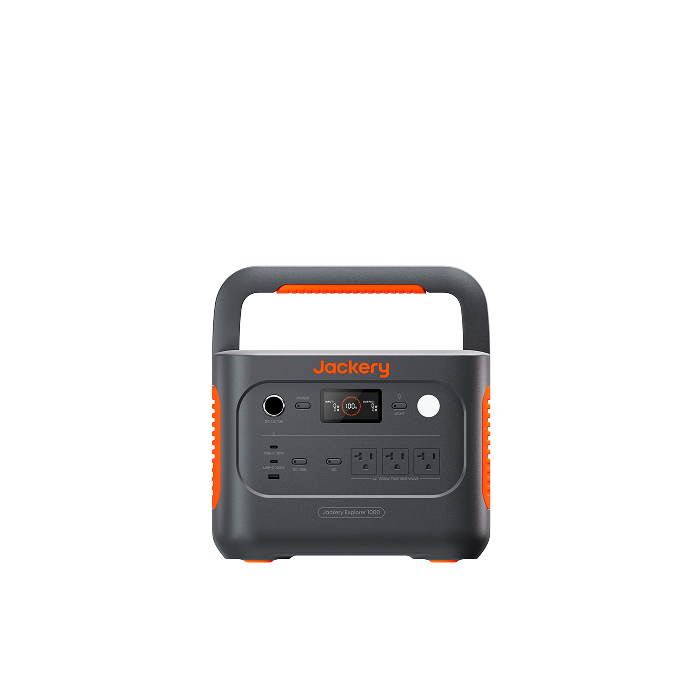
The Explorer 1000 v2 weighs about 23.8lb. Check the carrying route, operating space, and your energy budget together.
When I'd look at the Explorer 1000 v2
The Jackery Explorer 1000 v2 is a candidate when your priorities are everyday electronics, manageable carrying weight, and a relatively small footprint.
Its 1,070Wh rating clears the capacity requirement of our lighter example on paper. Under our same assumptions, keeping a 10% reserve leaves 963Wh to spend. That does not cover the 1,216Wh estimate with the refrigerator. Actual product losses still need checking; our calculation isn't a runtime claim for this model.
That doesn't mean it can't run a compatible refrigerator for a shorter period. It means I wouldn't sell you this particular overnight plan on capacity alone.
When I'd consider the HomePower 3000
The Jackery HomePower 3000 is worth comparing when you want more stored energy for a refrigerator and other essentials, and you have a practical place to use it.
Its roughly 59.5lb weight is a meaningful part of that decision. I'd want you to know how it will get upstairs and whether moving it elsewhere to recharge is realistic. Buying more capacity can reduce how soon you need another charge, while also making that eventual trip harder.
Neither model is automatically the best fit for every renter. The useful comparison is your device list, the outage you want to cover, and the weight and space you can live with. Check the current listing for price, availability, and what's included.
Set it up so you can actually use it at night
For the plan in this guide, compatible appliances plug into the power station's outputs. You're powering those selected devices directly. A charged battery sitting beside a wall outlet doesn't energize the rest of the apartment.
Never connect a power station's output to a wall receptacle to feed the apartment's wiring. Supplying building circuits requires an appropriate approved installation and professional involvement. Our transfer-switch guide explains that separate decision.
Check the refrigerator's connection while the lights are on. Can you access its plug without moving heavy furniture or pulling an appliance dangerously? If a cord is necessary, follow both manufacturers' instructions and use an appropriately rated cord. Don't run cords under rugs, pinch them through doors, or create obstacles across exits.
Put the station on a stable, dry surface in its permitted operating environment, with the airflow its manual requires. Keep it away from bedding, curtains, water, and heat. Indoor battery equipment doesn't need combustion exhaust routing, but it still needs appropriate ventilation and care.
Also expect that cooling fans may be audible. The Explorer 1000 v2 manual describes a quiet charging mode that reduces charging power and slows charging. That can be a useful trade-off in a small apartment, but it isn't a promise of silent operation during every load or charging mode.
Test the small-load settings as well as the big appliances
A power station may decide that a very small load means its output is no longer needed. That matters when your overnight priority is something like a router.
For example, the Explorer 1000 v2 manual describes a default energy-saving mode that can switch outputs off after twelve hours at low loads, including an AC threshold of 25W or less. Check the exact settings and instructions for your unit before relying on a small overnight load.
Its manual also specifies switching to battery within 20 milliseconds for its UPS function, with compatibility testing and equipment restrictions. It isn't a zero-interruption supply. For automatic operation, follow the supported setup and load limits; don't assume our multi-device, manually connected example is an approved UPS arrangement.
Get familiar with the physical buttons before an outage. If you plan to use app controls, set them up and learn which functions remain available without working home internet.
You can have apartment backup power without solar panels
If you don't have a suitable outdoor space, begin with wall charging. Charge the power station before the outage using its specified cable and a suitable outlet, following the manual's charging and storm instructions.
Check the load on that household circuit. Fast charging may draw substantial power; adding it beside a heater or another high-draw appliance can exceed the circuit's capacity. A power strip doesn't increase what the circuit can supply.
If you expect only a short opportunity to recharge elsewhere, check the charging mode and source requirements in advance. Quiet charging may be easier to live with, but slower. Advertised fast-charge times apply under specified conditions. Our guide to solar generator charging time explains those differences.
Keep the normal storage and maintenance instructions handy, too. “Ready for the next outage” includes checking the battery periodically, not leaving it forgotten and empty for months.
What if you do have a balcony?
Solar may be useful, but I'd check the actual location before buying panels. How much direct sun reaches it? Does the building above shade it? Are railings, neighboring buildings, or trees in the way? How much usable space remains once you preserve access and clear exits?
Then check permission, secure placement, weather exposure, cable routing, and the station's solar-input requirements. Don't improvise attachments above people below or pinch a cable in a window. The battery and the panels can have different environmental ratings.
A sunny-looking window isn't evidence that a panel will provide enough usable energy there. Test the actual arrangement. Plan around the input you can obtain over the day, including shaded periods, rather than multiplying the panel's nameplate wattage by every daylight hour.
Our solar panel sizing guide can help once you know the site's constraints. Until then, I would treat balcony solar as a possible addition to the plan, not the thing your next morning depends on.
Decide what happens if the outage lasts another day
Let's return to the more demanding night in our example: approximately 1,549Wh drawn from a hypothetical 2,000Wh battery, with no charging.
By morning, about 451Wh remains in total. Because we chose a 200Wh reserve, only about 251Wh is left to spend before reaching it. That's a signal to change the plan, even though the display hasn't reached zero.
You might stop laptop charging, use separately charged lights, or turn off internet equipment once you've confirmed the service is unavailable. Recalculate what remains. Keeping the refrigerator alone on our higher 75W average assumption would still require battery energy for conversion and the station itself.
Identify a realistic recharge location before you need one. That could be a friend outside the outage area or an authorized community charging location. Check that it has power, permits your equipment, and can support the charging load. Add travel and charging time to your plan.
Remember what you leave behind: if you take your only power station away to charge it, the refrigerator loses that supply. A portable phone battery is easier to carry, but it won't take over the refrigerator's job.
Have a food plan alongside the electrical plan. FoodSafety.gov's outage guidance says a refrigerator keeps food safe for up to four hours without power when the door stays closed as much as possible, and provides food-specific discard guidance. Use an appliance thermometer and the official guidance; don't judge food safety by whether the refrigerator light comes on or by tasting food.
If indoor temperatures, medical needs, water access, or other conditions make staying impractical, use your relocation plan. Backup power should help you through the disruption, not pressure you to remain somewhere you need to leave.
A simple practice run before the next outage
Once you've selected the equipment, give yourself a calm evening to learn it. Follow the manuals and test the noncritical devices you intend to use.
- Put everything in its planned location. Check access, airflow, plugs, and the route people will walk through the apartment.
- Connect your selected loads. Confirm the station supports them, including normal refrigerator starts if refrigerator backup is part of your plan.
- Check the settings. Know which outputs are on and whether low-load shutdown could interrupt your equipment.
- Record what happens. Note the starting battery level, elapsed time, appliance use, and remaining charge. A short trial is useful, but it won't reveal every defrost cycle or prove an entire night's runtime.
- Recharge and put the plan where you can find it. Keep the necessary cables, instructions, and building contact information together.
You should finish knowing what to plug in first, what to leave off, and when you'll need to recharge or change plans. That's much more reassuring than an unopened box with a large wattage number on it.
Apartment backup power questions
Can a power station run my whole apartment?
Some models can run several selected plug-in appliances, but that doesn't mean they supply every room or fixed system. For a renter's direct-plug setup, make a specific device list and verify output, startup requirements, and runtime. Electric heating, cooking, and air conditioning can change the requirement substantially.
Do I need my landlord's permission?
Check your lease and building policies for your proposed equipment and setup. A portable battery, permanently installed equipment, and panels attached outdoors are different situations. Ask management about the specific arrangement rather than relying on a general claim that all batteries or solar setups are allowed.
Should I buy solar panels with the power station?
Only if you have a permitted, practical place to use compatible panels. A wall-chargeable station can provide stored backup energy on its own. For an apartment with no useful outdoor exposure, I would put the first purchase toward the battery capacity and basic supplies you can actually use.
Is a larger battery always worth it?
More capacity can support a longer outage, but consider the purchase cost, storage, carrying weight, and charging plan together. If you mainly need phone charging and a light, your needs are very different from someone budgeting for a refrigerator through the night.
Build the plan around your next twelve hours
You don't need a backyard or a complicated installation to start preparing. You need a clear idea of what matters in your apartment, equipment that can support it, and a plan for when the stored energy runs low.
I'd start with your essentials, measure their energy use where practical, and choose the battery after the numbers and the physical setup make sense. Then I'd practice using it before the apartment goes dark.
Explore our apartment backup options when you're ready to compare equipment. If you'd like help narrowing it down, send us your device list, desired backup time, and carrying or space constraints. Those details give us something useful to work with—and help you buy a setup that fits your life.


