







You’ve picked out a power station. Then you look at where it can sit and where your appliances are—and realize the cords won’t reach.
There’s an extension cord in the garage. It fits the outlet. Surely that solves it?
It might, but I would check a few things before plugging it in. The cord that works for a lamp is not automatically right for a bigger appliance, and a powerful battery does not make every cord connected to it suitable.
Let’s walk through the decision together. By the end, you should know what information to look for, how to compare it, and when moving the power station is the better answer. We’ll focus on ordinary U.S. 120V AC equipment, with a real Jackery model and a clearly labeled household example.
Can you use an extension cord with a portable power station?
Yes, when the power station and connected equipment permit it, and the complete cord is correctly rated for the load, length, connections, and environment. A matching plug or a “heavy-duty” label is not enough. Some appliances should not be used with extension cords at all.
I would make the decision in this order: check the equipment instructions, work out the route, identify the electrical demand, and choose the cord. Starting with whatever happens to be in the garage reverses that process.
You are checking a whole path: power station, outlet, cord, and appliance. Each part has limits. The setup has to meet all of them, even if the station still has plenty of battery left.
First, which cable are you trying to extend?
“An extension cable for my Jackery” can mean three different things. Sorting this out first saves a surprising amount of confusion when shopping.
Powering something from the station’s AC outlet
This is the main situation in this guide: the station supplies electricity through a suitable household-style AC extension cord to equipment farther away. You check the connected equipment’s requirements against the station and cord.
Charging the station from a wall outlet
Here, electricity travels toward the station. Its charger is the load, and charging demand can be much greater than the demand of the small devices you plan to power later. Permission to extend an appliance connection does not automatically establish permission to extend the charging connection.
Reaching solar panels outside
That is a DC solar connection. It needs the correct solar cable, connectors, polarity, and electrical ratings. A household AC extension cord is not a substitute. Our solar-panel compatibility guide is the better starting point if this is the distance you need to cover.
For an RV shore-power inlet, use our RV power-station guide. Those connections introduce RV-specific requirements that an ordinary appliance-cord recommendation cannot settle.
Three different connections.
Check the appliance before choosing the cord
I would pick up the appliance manual before looking at cable thickness. Find the electrical connection section and search for “extension cord.” If the manufacturer prohibits one, a thicker cord does not cancel that instruction.
The U.S. Fire Administration’s appliance guidance says not to use extension cords with major appliances such as refrigerators, stoves, washers, and dryers. Do not treat a power outage as an automatic exception.
Portable heaters and air conditioners also need particular attention. Read their instructions instead of assuming that staying below the battery’s advertised wattage makes the connection acceptable. Where an extension is prohibited, choose an approved direct connection or another appropriate backup arrangement.
A direct connection to a portable station still requires compatibility checks. Removing the extension solves a distance problem; it does not establish that the station provides the right voltage, output, grounding arrangement, or startup capability.
For smaller electronics, check the power adapter as well as the device. A laptop’s charging brick may have information that is absent from the laptop itself. Keep the manufacturer’s supplied adapter unless an approved alternative is specifically supported.
This is also where I would narrow the job. If the purpose is keeping your internet equipment powered, identify exactly which boxes need electricity. Our Wi-Fi backup guide helps with that list. You may need a much simpler arrangement than one cord serving an entire room.
Can you move the battery closer?
Before buying a longer cord, look for a suitable place nearer the equipment. One useful feature of a portable station is that you can position it for the task, within its operating instructions.
I would measure the route the cord can actually take, rather than the straight-line distance across the room. Leave enough slack that the plug is not pulled sideways or held under tension. Then choose the shortest suitable single cord that reaches comfortably.
Do not solve the distance problem by creating a placement problem. Keep the station dry, upright, and ventilated as its manual requires. A cramped cabinet, a pile of blankets, or a spot beside a heat source may be convenient without being suitable.
Look at the route as someone else in the household would experience it. Will they cross it on the way to the bathroom after dark? Could a chair leg crush it? Could a door close on it? A route that needs the cord hidden under a rug or pinched through a doorway needs rethinking.
The Consumer Product Safety Commission’s extension-cord guidance covers marked ratings, damage, routing, and appropriate outdoor use. It also treats extension cords as temporary equipment. If this becomes an everyday substitute for an outlet in the right place, talk to an electrician about a permanent solution.
Read the cord label without getting lost in the numbers
Once you know an extension is permitted and how far it must reach, the label starts to mean something. I would look for the following information on the cord, its tag, and the manufacturer’s documentation.
| Marking or detail | What it helps you establish |
|---|---|
| Rated amps and voltage | The complete cord’s electrical limits, which must suit the source and connected load. |
| Wire gauge, such as 12 AWG | The conductor size. A lower AWG number means a larger conductor; it is not the complete cord rating. |
| Conductor count, such as 12/3 | For this extension-cord notation, three 12-AWG conductors, including the grounding conductor. |
| Length | The actual reach of the cord you are evaluating, which matters when checking voltage drop and application instructions. |
| Indoor/outdoor designation | Where the cord may be used. Outdoor suitability does not make every connection or attached device waterproof. |
| Plugs, sockets, condition, and listing | Compatible, intact connections and a listing from a recognized testing laboratory. CPSC identifies UL, ETL, and CSA as examples. |
Here is a real example of why the gauge number is not the whole answer. Southwire lists its 25-foot 12/3 triple-outlet cord, model 4187SW8802, at 15A, 125V, and 1,875W. It has three outlets, but the assembly is still rated 15A. That is not 15A for each socket simultaneously.
This is a label-reading example, not a recommendation for every Jackery or appliance. Its 12-AWG conductors do not turn the complete cord into a 20A cord.
Also notice the voltage behind the wattage: 125V × 15A = 1,875. At a nominal 120V source, 15A corresponds to 1,800W for a load with power factor 1—the simple case where watts equal volts times amps. The printed 1,875W is not permission to exceed 15A at 120V, and neither calculation overrides equipment instructions or other operating limits.
Illustrated specifications, not a photograph of its tag.
If the tag is missing, the markings are unreadable, or the listing cannot be matched to the product, I would choose a cord with documentation I can verify. Cable color and words such as “professional” do not give you the missing rating.
What gauge extension cord should you use?
There is no single gauge I would recommend for every portable power station. Start with the appliance’s instructions and the cord manufacturer’s load-and-length guidance. Then confirm the complete assembly’s rating and intended environment.
Think about a small charger near the station versus equipment at the far end of a garage. Even if both use a familiar plug, the load and distance can lead to different cord choices. Buying the thickest cord you see still does not resolve an appliance that prohibits extensions.
For comparable conductors, a longer run has more resistance, while a larger conductor has less resistance per foot. Current through that resistance causes voltage loss and heating. Fluke explains the relationship between loading, wire length, and gauge in its guide to voltage drop and power quality.
Here is a deliberately simplified illustration. Suppose an entire outgoing-and-return conductor path has 0.20 ohm of resistance and carries a steady 10A. The calculated voltage drop is 2V, and the conductors dissipate 20W. Double that resistance while keeping current at 10A, and those figures become 4V and 40W.
Those are hypothetical electrical values, not a rating for any particular gauge or length, and not an acceptable-loss threshold. They show why extra distance deserves attention. Real equipment can also change its behavior as voltage changes.
You do not need to calculate resistance to buy an ordinary cord. You do need a documented match between the cord, distance, and load. If the instructions do not establish that match, ask the manufacturers or a qualified electrician rather than using a generic internet gauge chart as approval.
Your power station has more than one limit
The big wattage number on a product page is useful, but it is not a promise that every cable or outlet can carry that amount independently. I would check the total AC output, individual outlet markings, and the operating mode.
For a concrete example, the U.S. Jackery Explorer 1500 v2, model JE-1500D, has three AC outlets and a 2,000W rated total AC output in the manual’s specified temperature range. Three sockets share that total; they do not create three separate 2,000W supplies.
Its manufacturer manual also specifies a lower 1,440W maximum AC output in bypass mode, when external AC is supplying the output while charging is available. It lists reduced battery-mode output in very cold conditions too.
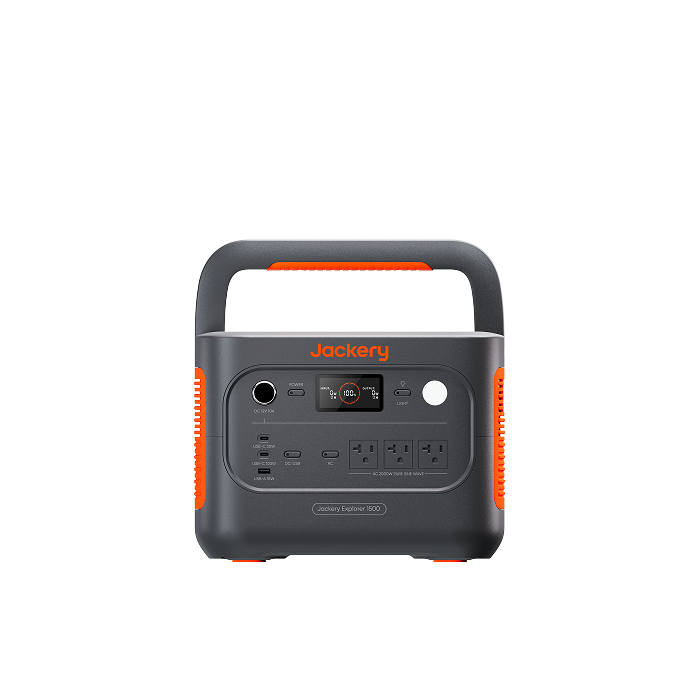
One shared AC output limit
Check the operating mode, too.
Now imagine using a permitted 15A cord with a station whose total output can exceed 15A. The cord keeps its own 15A limit. The power station does not read its tag and automatically lower the limit to match it.
This is why I would never use “nothing tripped” as proof that the cord is suitable. Overload protection is valuable, but it does not replace checking the cord’s rating, condition, and connections.
Battery capacity is another separate question. Watt-hours help you plan how long equipment can run; they do not determine how much current a cord can carry. If you are still choosing capacity, our home-backup sizing guide handles that calculation.
Let’s plan a small household setup
Suppose your goal is to work at a table during an outage. You need a laptop charger, a router adapter, and an LED lamp. The battery is nearby in a permitted location, but their own cords do not reach it comfortably.
For this example, assume the equipment manufacturers permit the proposed extension arrangement, the chosen cord has three integral outlets, and the station is operating on battery only. These are hypothetical nameplate values, not measurements or specifications for particular appliances.
| Equipment | Assumed maximum input current |
|---|---|
| Laptop power adapter | 1.5A |
| Router power adapter | 0.6A |
| LED lamp | 0.2A |
| Combined allowance | 2.3A |
That 2.3A total is the sum flowing through the shared cord in our planning example. Compare it with the cord’s marked current limit, then check the station’s outlet and total limits. Confirm startup behavior, required length, and all instructions as well; passing this arithmetic is one part of approval.
I used input current on purpose. A laptop adapter labeled “65W” may be describing its DC charging output. That is not automatically its AC input demand. For AC equipment, power factor also matters: dividing watts by volts alone does not always give the current the cord must carry. Use the documented AC input rating or suitable measurements.
Now keep the 15A cord rating from our label example in mind. If another permitted load needing 13A were added to the shared path, the combined demand would become 15.3A. That exceeds the cord’s rating. An empty socket is not unused electrical capacity.
isn’t extra capacity.
Router adapter 0.6A
LED lamp 0.2A
In our original three-device plan, I would label the setup for those devices and keep the ratings with it. That helps someone else understand why adding another appliance changes the calculation.
If a suitable USB-C output can charge the laptop directly, that may remove one AC adapter from the arrangement. Verify the laptop’s charging requirements, the station’s port capabilities, and the USB-C cable. Do not replace a router’s power supply with a random cable because the connector looks right.
What about power strips and connecting cords together?
A multi-outlet cord, a power strip, and a surge protector are not interchangeable names for the same product. Their instructions can allow different uses. Read the documentation for the exact item instead of treating extra sockets as an automatic upgrade.
Where a power strip is permitted, its total rating applies to everything connected to it. Follow its instructions about the source, placement, protection, and direct connection. Do not attach it to an extension cord if its instructions require a direct connection to an appropriate outlet.
For distance, choose one suitable cord of the required length. Connecting several shorter cords adds connection points and makes it easier to overlook the lowest rating somewhere in the chain. If one section is rated lower, a stronger cord elsewhere does not increase that section’s capacity.
Grounded equipment needs its grounding connection preserved. Never remove a ground pin, force a plug into an incompatible socket, or improvise a neutral-ground connection. If a surge protector or other protection device reports a grounding fault, resolve the compatibility question with the manufacturers or an electrician; do not bypass it.
For a small temporary setup, I would first see whether the station’s existing outlets and approved device cables can meet the need. Fewer components usually make the arrangement easier to understand and inspect.
Can you charge a Jackery through an extension cord?
Check the charging instructions for your exact model before doing this. I would start with its supplied charging cable connected as directed. If you need extra reach and the documentation does not clearly permit the proposed extension, ask Jackery to confirm it.
For the Explorer 1500 v2 discussed above, the manual lists up to 15A AC input in charging mode. A plan based on powering only a lamp tells you little about this separate input connection.
The available wall circuit matters too. Other equipment may already be using it, and a different nearby socket can be on the same circuit. A longer cord cannot add circuit capacity. A supported charging-power adjustment may reduce demand, but it cannot fix damaged equipment or make a prohibited connection acceptable.
If charging while supplying equipment, check the mode-specific instructions. This model’s UPS section recommends one connected device at a time and warns against simultaneous multiple devices. Our earlier three-device example was battery-only; it is not a UPS-mode recommendation.
Our guide to using a station while charging explains the broader differences. Never connect a station’s charging input to its own output, directly or through equipment it is supplying. That cannot replenish the energy it uses.
Set up the route before switching anything on
Once the equipment and ratings match, do the physical check while the cord is disconnected. It is much easier to spot a damaged section when you lay out the whole length.
- Inspect the complete cord. Check the insulation, both ends, ground pin where fitted, and strain relief. Replace damaged cords rather than covering damage with tape.
- Lay it out as instructed. Follow any reel or coiled-use restrictions. Do not assume a cable reel has the same usable rating wound up as fully extended.
- Keep the route clear. Avoid rugs, furniture legs, doorways, sharp edges, and places where people or vehicles can damage the cable.
- Protect the environment. Use an outdoor-rated cord where required, keep connections within their exposure limits, and follow all required ground-fault protection instructions. An outdoor cord does not change the station’s environmental rating.
- Seat compatible plugs fully. Do not use a loose connection or put weight and pulling force on it. Follow the equipment’s connection and startup sequence.
- Check operation under the planned load. Watch for abnormal behavior and inspect the arrangement again if the load, location, or charging mode changes.
The Explorer 1500 v2 manual specifies an indoor-type operating environment and says it is not waterproof or dustproof. Keep it protected and ventilated rather than leaving it exposed because the cord can go outside.
If a cord or connection becomes hot, produces a burning smell, discolors, crackles, or sparks, stop using the setup. Turn off the source if safe to do so; do not touch damaged energized parts. Resolve the cause before reuse. Repeatedly resetting a shutdown is not troubleshooting.
A successful short trial is useful, but it is not proof that a damaged or incorrectly rated setup is safe. The ratings and instructions need to be right before the trial begins.
An extension cord cannot turn a wall outlet into a home-power inlet
Powering a device plugged into the station is different from supplying your home’s installed wiring. Never connect a portable station’s output to a household wall outlet to try to energize the room or electrical panel.
The CPSC warns against male-to-male extension cords, whose exposed prongs can become energized. Do not use one.
If you want selected household circuits powered through the panel, read our transfer-switch guide and have a qualified electrician establish a compatible installation. A cord purchase cannot replace the required equipment and electrical separation.
A few questions you may still have
Is a 12-gauge extension cord always the best choice?
No single gauge settles every setup. A larger conductor can reduce resistance, but the complete cord rating, distance, environment, plugs, and appliance instructions still matter. The Southwire example above is 12/3 and rated 15A; the gauge does not erase that limit.
Can I use a 50-foot or 100-foot cord?
Length alone cannot answer that. Check the exact load and the cord manufacturer’s guidance for that length. First consider whether suitable station placement can shorten the run. Do not turn a 25-foot recommendation into approval for 100 feet because the gauge matches.
Will an extension cord reduce battery runtime?
Resistance in a loaded cord dissipates some energy as heat. How much depends on the current and complete path resistance. There is no universal percentage to subtract from runtime. Use an appropriate cord and budget from actual equipment demand rather than adding an arbitrary “extension-cord loss” figure.
Can I leave everything connected overnight?
Only when the equipment’s instructions and intended use permit the arrangement. Check the station’s automatic output settings, the loads that cycle on later, and any monitoring requirements. Overnight use does not remove restrictions on extension cords, and an extension should not become permanent wiring.
Choose the connection along with the battery
When someone asks me which cord to buy, I want to know what it will power and how far it needs to reach. Those two details are much more useful than the power station’s battery size alone.
Start with equipment that permits the connection. Put the station in a suitable location, read the actual ratings, and keep the arrangement simple enough that everyone using it understands what belongs on it.
If you need help with the Jackery side, send us the exact station model, appliance models or input labels, and required distance. Tell us whether you are extending an output or the charging input. We can help identify the relevant specifications and documentation, with any unresolved electrical or installation questions handled by the manufacturer or a qualified electrician.


